Phone: +1 609 439 4775

Mobile App for Field Service Scheduling and Dispatch

Field service scheduling looks simple until the phone starts ringing.
One technician is stuck on a job that should have finished an hour ago. Another has called in sick. An urgent service request has just come in, and the nearest technician doesn’t have the right skill set. Meanwhile, a customer is calling the office asking when someone will arrive.
For a small team handling a few jobs a day, phone calls, spreadsheets, or even a whiteboard may be enough. Add more technicians, more customers, or another branch, though, and those methods become difficult to manage.
That’s where field service management software and mobile scheduling start to make a practical difference.
Instead of keeping the day’s plan in the office, the schedule travels with the technicians. New jobs can be dispatched to their phones, changes can be sent while they’re on the road, and the office can see what’s happening without calling every technician for an update.
Here’s how mobile scheduling and dispatch works, what to look for in an app, and how Field Force Tracker handles the process.
Why Scheduling and Dispatch Need to Be Mobile
Think about what happens when an emergency call comes in at 2:30 in the afternoon.
The dispatcher needs to answer several questions quickly. Who is available? Who has the right experience? Where are they now? How long will their current job take? And if a new job is assigned to them, what happens to the rest of their schedule?
Trying to figure all of that out through phone calls takes time.
With job scheduling software, the dispatcher has a much clearer view of the day. Jobs can be moved when priorities change, and technicians can receive updated information without coming back to the office.
The technician benefits too. Instead of getting an address over the phone and asking for the details later, the work order is already on the device.
This becomes especially useful once a company reaches the point where one dispatcher can no longer keep every technician’s schedule in their head. We looked at that transition in more detail in our guide on how to automate job scheduling for field teams.
Some of the problems this helps solve are familiar to almost every service company:
- Two jobs accidentally assigned to the same technician at the same time
- A technician sent across town when another qualified tech is already nearby
- The office not knowing that a job is taking longer than expected
- Technicians working from old job information
- Customers calling repeatedly for arrival updates
- Paper work orders being completed hours after the actual work
None of these problems sounds particularly serious on its own. Put several of them into the same busy day and the schedule can unravel quickly.
What Should a Good Scheduling and Dispatch App Actually Do?
There are plenty of apps that can put appointments on a calendar. That’s not quite the same thing as managing field service work.
A useful dispatch system has to account for the fact that field schedules change constantly. Jobs run long. Customers cancel. Emergency calls appear. Technicians need parts. Traffic gets in the way.
The software needs to make those changes easier to handle rather than simply displaying the original plan.
A Dispatch Board You Can Actually Work With
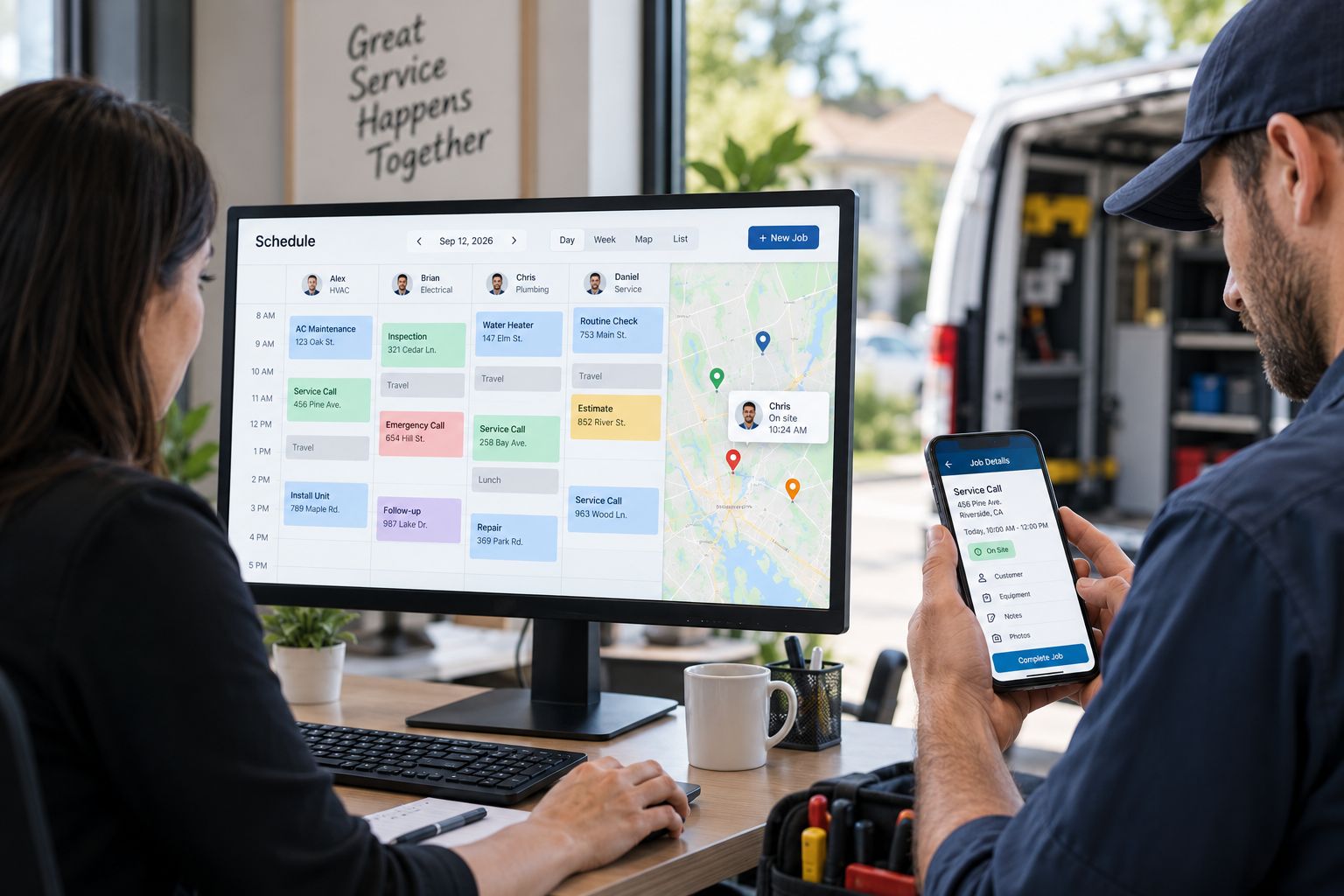
Field Force Tracker uses a drag-and-drop dispatch board, so jobs can be moved when the day changes.
Dispatchers aren’t limited to one view either. Depending on what they’re trying to figure out, they can use month, week, grid, map, or list views.
The map view, for example, is useful when location matters. A calendar may tell you that two technicians are available at 3:00 PM, but the map can help show which one makes more sense for a job based on where they’re working.
Jobs can also be color-coded by priority, and separate dispatch boards can be used for different teams or branches.
That becomes important as the operation grows. A company running several crews shouldn’t have to squeeze every job onto one crowded calendar.
Scheduling Based on More Than Availability
An open spot on a calendar doesn’t necessarily mean someone is the right person for a job.
Suppose an HVAC customer has a problem with a particular piece of equipment. Technician A has an opening, but Technician B has worked on that equipment before and is finishing another call nearby.
Simply choosing the first available person isn’t always the best decision.
Field Force Tracker can take things such as job type, technician skill, location, department, branch, and equipment into account when narrowing down who should handle the work.
For companies with larger teams, those rules remove some of the guesswork from dispatching.
Knowing What’s Happening After the Technician Leaves
Dispatch doesn’t end when somebody clicks “assign.”
The office still needs to know whether the technician has started the job, whether the visit is taking longer than planned, and whether something else needs to be rescheduled.
That’s where real-time status becomes useful.
Rather than waiting for an end-of-day update, dispatchers can see job activity as technicians work. If a morning repair runs into the afternoon, the dispatcher has a chance to deal with the next appointment before the next customer starts wondering where the technician is.
This is one of the practical differences between a static calendar and connected dispatch software. The schedule reflects what’s happening in the field, not just what was planned at 8:00 that morning.
The Mobile App Is Where the Field Team Comes In
The dispatch board helps the office. The mobile app has to do the same for the person actually standing in front of the equipment.
Field Force Tracker’s field service app is available for iPhone and Android and gives technicians access to the information associated with their assigned work.
A technician can use the app to:
- Review the work order before arriving
- Check customer and equipment service history
- Accept, start, pause, and complete jobs
- Add diagnostic and completion notes
- Take and attach photos
- Capture customer signatures
- Complete checklists and inspection forms
- Prepare quotes and estimates
- Create invoices
- Collect supported payments
- Clock in and out
- Request parts and review inventory information
That matters because technicians shouldn’t have to call the office every time they need to know what happened on the customer’s previous visit.
Customer history can be particularly useful on repeat service calls. If a component was replaced six months ago or another technician left notes about an intermittent problem, having that information at the job site gives the current technician somewhere to start.
We’ve covered the technician side in more detail in 8 benefits of a mobile field service app for field technicians.
What If the Technician Has No Signal?
This is easy to overlook when comparing field service apps.
Technicians don’t spend their entire day in places with reliable Wi-Fi or a strong mobile signal. They may be working in basements, equipment rooms, rural locations, warehouses, or large commercial buildings where reception drops out.
Field Force Tracker allows certain job and scheduling information to remain available when the device temporarily loses its connection. Notes and photos can be held and synchronized once the technician is back online.
Naturally, anything that depends on live data still needs a connection. Current inventory information and payment processing are examples.
Offline access doesn’t sound like a headline feature until a technician needs it. Then it matters quite a bit.
Can Mobile Scheduling Help With Double-Booking?
It can certainly make double-booking easier to avoid.
The problem usually isn’t that a dispatcher deliberately assigns two jobs to the same person. It happens because information is split between different places.
Maybe one appointment is on a spreadsheet while another was written down after a phone call. Perhaps somebody changed a job but didn’t update the shared calendar. Or two people in the office scheduled work at roughly the same time.
A shared system gives everyone the same view of technician availability.
We’ve discussed this problem specifically for plumbing businesses in how plumbing companies use a field service app to stop double-booking, but the issue isn’t unique to plumbers. HVAC companies, electricians, appliance repair businesses, alarm companies, and other mobile service teams run into the same problem.
Different Trades, Same Scheduling Headaches
The details of the work change from one industry to another, but the scheduling questions are remarkably similar.
Who’s available?
Who’s qualified?
Who’s nearby?
What’s urgent?
What still needs to be finished today?
Field Force Tracker is used across industries including HVAC, plumbing, electrical service, alarm and security, elevator maintenance, medical equipment, fitness equipment, office equipment, telecom, and industrial machinery repair.
There are differences in how each trade works, of course.
An HVAC business may need to match technicians to particular equipment or skills while handling seasonal spikes in service calls. HVAC field service software can bring those scheduling and service requirements into the same workflow.
Plumbing businesses have their own pressures. Emergency calls can arrive without warning, and one difficult repair can throw off the rest of a technician’s day. Plumbing company software helps keep those service calls, work orders, and technician schedules connected.
The software also connects with accounting platforms including QuickBooks, Xero, and Sage, while an API is available for businesses that need to connect other systems.
FAQs About Mobile Field Service Scheduling and Dispatch
Can technicians create or reschedule jobs from the mobile app?
Technicians can manage work orders and scheduling from the Field Force Tracker mobile application based on the permissions and workflow set up by the company.
Can technicians prepare a quote while they’re at the job?
Yes. Technicians can create estimates using available service, labor, and inventory information. That means the customer doesn’t necessarily have to wait for somebody in the office to prepare the quote later.
Can technicians invoice customers in the field?
Yes. Invoices can be created from the field, and supported payment methods can be collected at the job site.
Is Field Force Tracker available on both iPhone and Android?
Yes. The mobile app supports iOS and Android devices, including phones and tablets.
What happens when the technician doesn’t have internet access?
Certain job information remains available offline. Notes and photos can synchronize after the connection returns. Features that rely on live information or online payment processing require connectivity.
Is this only useful for large field service companies?
No. Smaller teams can use straightforward scheduling and dispatch, while larger operations can make greater use of automatic scheduling rules, branches, departments, technician skills, and location information.
Does scheduling software prevent every late appointment?
No software can prevent a repair from taking longer than expected, a vehicle getting stuck in traffic, or an emergency call appearing halfway through the day.
What it can do is make those situations visible sooner. That gives the dispatcher more time to rearrange work and communicate with the people affected.
A Better Way to Keep the Office and Field in Sync
The real value of a mobile scheduling app isn’t that it replaces a paper calendar with a digital one.
It’s that the schedule becomes connected to the work.
The dispatcher can see who’s available and what is happening in the field. The technician can see the work order, service history, notes, and schedule without repeatedly calling the office. When something changes, both sides can work from updated information.
For a field service company handling a growing number of technicians and service calls, that connection becomes increasingly important.
Field Force Tracker combines scheduling, dispatch, technician management, work orders, customer information, estimates, invoicing, payments, and mobile field tools in one system.
If you’d like to see how it fits your own service operation, you can request a free Field Force Tracker trial and demo.