Field Service app

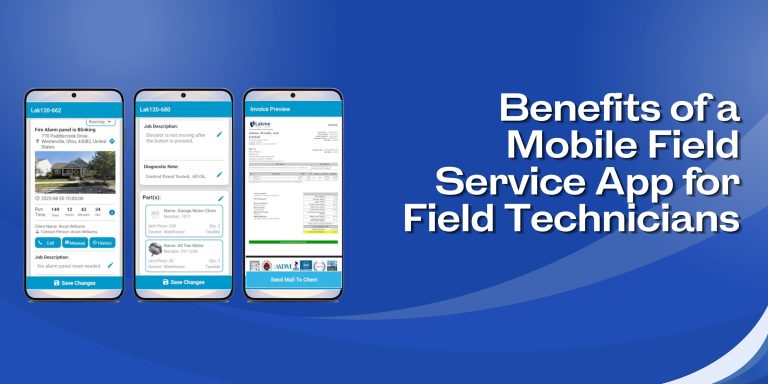
8 Benefits of a Mobile Field Service App for Field Technicians

Field technicians are always on the move. One job ends, and another begins, sometimes in a completely different part of town. Carrying paperwork orders, calling the office for customer details, or waiting for updates slows everything down.

A mobile field service app puts all the important information right on a technician’s phone or tablet. No more back-and-forth calls. No more guesswork. Just the job details, history, and tools needed to get the work done properly. Here are 8 benefits that make a real difference in daily field work.

1. One-Click Access to Full Job Details

The moment a job is assigned, the technician gets a notification. Opening the job makes everything visible instantly, from the customer’s name to address, job description, and previous service history.

Available for technicians to review:

  • Full job details
  • Customer information and contact numbers
  • Job history and asset information
  • Calendars and daily schedules

No phone calls required. Everything is there in one place.

2. Full Customer and Equipment Repair History

Before arriving at a job site, a technician can already know what was done there last time. The app shows the complete service and repair history for every customer and every piece of equipment.

This helps technicians:

  • Ensure that all previous work is checked before beginning any new job.
  • Check the specification sheets, warranties, and other records related to each machine.
  • Include additional diagnostic comments while performing the present service.
  • Speak to the clients with confidence, based on actual information rather than guessing.

3. Real-Time Updates Between Field and Office

When something changes at the office, the technician finds out right away by email or text. When a technician updates a work order on site, the office sees it immediately, too.

This two-way update system cuts out most of the unnecessary calls during the day. Schedule changes, job notes, and status updates all move back and forth without delay. The office and the field always stay in sync.

4. Quotes and Invoices Created Right at the Job Site

There is no need to get back to the office or wait until the next day to send a quote. The app lets technicians build estimates on the spot using actual inventory, service, and labor data.

From the field, technicians can:

  • Quotes with detailed information can be built from images, parts numbers, and prices.
  • An estimate can be generated and submitted to customers within a few seconds.
  • Generate an official invoice for the work right after finishing the service.
  • Take the payment directly from customers via credit cards, bank transfer, cash, checks, etc.

5. Photos, Signatures & Inspection Forms

It is difficult to trace paper documents. Technicians have everything they need to document their work using a single mobile field service application: capturing images of the equipment, writing diagnostic and completion notes, and signing a document right from a phone.

Custom checklists and inspection forms will allow technicians to document equipment state systematically. Over time, a reliable service record is accumulated.

6. Manage Inventory and Access Parts Remotely

Technicians can check in advance whether required parts are already in the warehouse. In case of necessity, a technician will be able to order additional parts remotely before performing a service.

Using the app, technicians will be able to:

  • Document materials and parts used in a particular job
  • Capture information about time and materials on-site
  • Maintain inventory without any extra paperwork

7. Timesheets and Auto-Invoicing

The clock-in and clock-out details are managed within the application. Technicians will manage clocking themselves right from their smartphones, eliminating the use of paper timesheets and reducing billing mistakes.

Once a job is marked as complete, the automatic sending of an invoice becomes possible. This ensures faster billing and minimizes chances of misunderstandings regarding what work was completed and how much time was spent.

8. Works Even Without an Internet Connection

The locations that have poor internet connectivity, such as remote regions and basements, create difficulties for field technicians. The mobile app can assist in helping the technicians view information about the work schedule even without an internet connection.

There are some aspects that require an internet connection; however, work-related information can still be viewed despite the lack of internet connectivity.

Why Field Force Tracker Stands Out

Field Force Tracker is an enterprise-grade field service software that has been in development for over 15 years. It is used by thousands of businesses in 30+ countries and supports industries including HVAC, plumbing, electrical, security, fire alarms, elevator and lift repairs, copiers, office automation, medical equipment, industrial equipment repair, and more.

Key Things to Know About Field Force Tracker

  • Native mobile apps available on Apple App Store and Google Play Store.
  • Works on any iPhone, Android phone, or tablet.
  • Supports multiple time zones and currencies for international teams.
  • Covers scheduling and dispatch, work order management, inventory, invoicing, contracts, timesheets, sales CRM, reports, and more.
  • Offers personalized onboarding, unlimited online support, and help with data migration from old systems.
  • Integrates with QuickBooks, Xero, Sage, and other tools via API.

FAQs (Frequently Asked Questions)

  1. How do technicians download the Field Force Tracker app?

The app is available on the Apple App Store for iPhone and iPad and on the Google Play Store for Android phones and tablets.

  1. Can a field tech create a new work order from the app?

Yes, a technician can create or schedule a work order directly from the mobile app. Admin controls allow businesses to set how this works based on their own workflow.

  1. Can technicians reschedule jobs from the mobile app?

Yes, a technician can pause a job and push it to a later date or time. The app gives technicians several controls to manage their jobs throughout the day.

  1. Can quotes and estimates be built from the mobile app?

Yes, Quotes can be generated by technicians from the field through the use of information related to products in inventory, work, and services. Pictures, product numbers, and prices can all be viewed within the application to develop estimates.

  1. Can invoices be created and payments collected in the field?

Yes, a technician can generate a professional invoice after finishing a job and take payment on the spot by credit card, ACH, cash, check, or digital payment.

  1. Can technicians add diagnostic notes for equipment they service?

Yes, the app allows technicians to add diagnostic notes to each piece of equipment during a service visit, which builds a complete and searchable maintenance history over time.

Get Started with Field Force Tracker

Field Force Tracker is trusted by field service businesses across 30+ countries. The mobile app works on both iPhone and Android and is built to be fast and easy to pick up, even for technicians who are not very tech-savvy.

A free trial is available at fieldforcetracker.com.

Fire Alarm Installer Software

Deploying Field Service Software for Service Business

In today’s fast-paced field service industry, managing a mobile workforce efficiently is crucial. Whether you’re running an HVAC repair business, a plumbing company, or an electrical contracting firm, juggling service calls, technician schedules, customer requests, and inventory can quickly become overwhelming. This is where Field Services Management Software plays a transformative role — streamlining operations and improving team productivity.

At the heart of this revolution is Field Force Tracker, a powerful solution that empowers field teams with smart scheduling tools, real-time updates, and seamless job tracking.

Why Smart Scheduling Matters for Field Teams

Manual scheduling is prone to errors — double bookings, missed appointments, and inefficient dispatching can cost your business time and money. Smart scheduling tools offered by Field Service Software like Field Force Tracker eliminate these risks by automating job assignments based on technician availability, location, and skill set.

With drag-and-drop calendars, GPS tracking, and real-time notifications, businesses can quickly assign the right technician to the right job — ensuring faster response times and better customer service.

Optimize Operations with Field Services Management Software

Field Force Tracker’s Field Services Management Software goes beyond scheduling. It provides end-to-end visibility of every service request — from job creation to completion. Managers can track work orders, monitor technician performance, manage customer information, and handle invoices all from one central dashboard.

These capabilities help reduce downtime, eliminate paperwork, and ensure that field operations run like clockwork.

Specialized Solutions for Every Trade

Every industry has its unique challenges, and Field Force Tracker understands that. That’s why the platform offers tailored solutions to meet the specific needs of various service businesses.

1. HVAC Field Service Software

For HVAC companies, scheduling emergency repairs and preventive maintenance efficiently is vital. With HVAC Field Service Software, dispatchers can assign jobs based on real-time technician availability and HVAC expertise, while technicians can access service histories and equipment details on-site via mobile devices.

2. Plumbing Service Software

Plumbing jobs often involve urgent requests and require precise coordination. With the Plumbing Service Software, plumbing businesses can automate appointment scheduling, track inventory, and generate invoices instantly, reducing the time spent on administrative tasks and boosting first-time fix rates.

3. Software for Electrical Contractors

Electrical projects can range from quick repairs to complex installations. The Software for Electrical Contractors enables accurate scheduling, safety compliance tracking, and seamless communication between office staff and electricians, ensuring every job is completed on time and safely.

4 Software for Fire Alarm and Security Service Businesses

Fire Alarm and Security Businesses deal with high level of compliance issues. The jobs could include new installation, inspections or simply fixing some areas.  With Fire Alarm and Security Service Software, businesses can automate appointment scheduling, track inventory, and generate invoices instantly, reducing the time spent on administrative tasks and boosting first-time fix rates. The system can auto generate monthly or quarterly invoices for monitoring services

5. Software for Elevator Service Businesses

Elevator Service Businesses deal with all kinds of urgent elevator repairs and installations. The jobs could include new installation, inspections or simply fixing some areas.  With Elevator Service Software, businesses can automate appointment scheduling, track inventory, and generate invoices instantly, reducing the time spent on administrative tasks and boosting first-time fix rates. The system can auto generate monthly or quarterly invoices for preventive maintenance services.

Mobile Access for On-the-Go Efficiency

Today’s workforce needs mobility. Field Force Tracker provides a robust mobile app that allows technicians to receive job updates, upload photos, collect digital signatures, and update service statuses — all from the field. This not only improves transparency but also enhances accountability and customer satisfaction.

Why Choose Field Force Tracker?

Trusted by businesses worldwide, Field Force Tracker delivers a comprehensive suite of features designed to improve service delivery and team productivity. From job scheduling and route optimization to reporting and customer management, it’s an all-in-one Field Service Software that adapts to your business needs.

Ready to Transform Your Field Operations?

Say goodbye to scheduling chaos and hello to a streamlined, automated workflow with Field Force Tracker. Whether you’re in HVAC, plumbing, electrical, or another service industry, our smart scheduling tools can make a real difference.

Keywords: Field Services Management Software, Field Service Software
Landing Page: https://www.fieldforcetracker.com/field-service-management-software/
Title: Simplify Your Team’s Workflow with Smart Scheduling Tools

Contact Field Force Tracker
📧 Email: info@fieldforcetracker.com
📞 Phone: 609-439-4775

Comparing field Service software

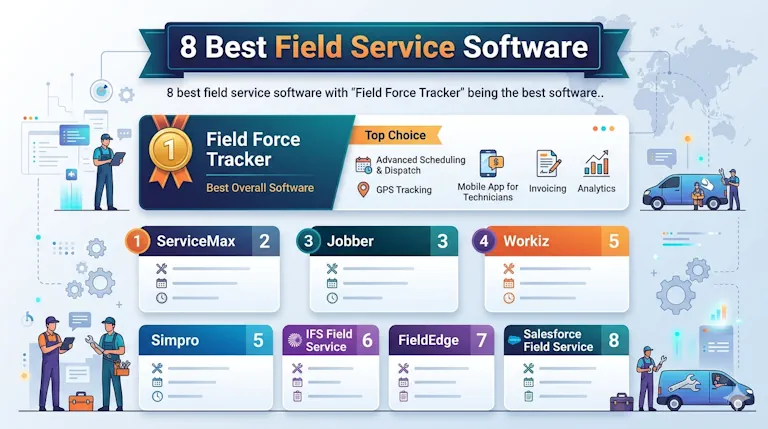
8 Best Field Service Dispatch Apps to Streamline Service Operations and Improve Profitability

App Store: iOS  Google Play: Android

Field Force Tracker’s cloud-based all-in-one field service management software offers advanced scheduling and dispatching features alongside appointment booking, job management, and technician dispatch more. Our advanced dispatching and scheduling software gives field service businesses (like HVAC, plumbing, and electrical, fire alarm and security) the tools they need to keep field service teams flexible and proactive all day long.  By better utilizing their workforce and maintaining higher level of service, they can maintain high level of profitability. This article shows the best FSM software and compares their main functionality.

Field Service Software can be divided into three main categories or groups:

A. Small Team Software : These software are typically designed for handyman and very small teams of 1-5 users. They offer very basic feature but lack more advanced features such inventory, contracts management, billing statements, job automation, third party integrations and advanced financial reporting to run a more organized service business. They are typically used by mom-and-pop businesses or a very small business as they often lack ability to scale for larger teams of 4 or 5 persons. They are often unable support more than ten technicians at the same time or not suitable for bigger teams and lack other industry specific features. Bulk of FSM software marketed falls in this category. Examples are: Jobber, Housecall Pro, Service M8, RazorSync, Workiz etc,

B. Small and Medium Business (SMB) Software : These software are primarily geared for small and medium business (SMB) market with 5+ users. They offer more advanced feature to manage multiple warehouses, inventory management, recurring billing support and large third party integrations. More importantly, they can support larger teams, and sometimes multiple branch offices too. Some software are designed only for a certain business types like HVAc/Plumbing, while others like Field Force Tracker, can offer much more wider features, support for multiple branch offices and departments, and special customization for wider industry types. Examples are: Field Force Tracker, Service Titan, Service Pulse

C.Advanced Enterprise Software: These are purely designed for large enterprises with turnover in billions of dollars and thousands of employees. Large telecom operator or manufacturers may have them as extended module of their ERP systems. They can support 1000+ users and vast geographical areas. They offer vast customization and are very expensive to deploy for most small businesses. Examples are: SAP, Oracle, ServiceCEO, ServiceMax/ SalesForce.

Below we compare the best 8 field service software and describe their features.

1. Field Force Tracker

Field Force Tracker is an advanced Service “CRM” software for a service businesses – maintains customer database, repair history of customer installed equipment, manages service job scheduling to technicians, past invoices, payments and service agreements, track Maintenance Schedule etc. As an all-in-one FSM, it supports wide range of features and service businesses.

Software supports all kind of service businesses and leads in many sectors such as — Elevator Service Companies (that maintain and install elevators and lifts), “Video Surveillance, Security and Fire Alarm” Companies (companies that maintain, install and monitor fire alarms or security alarms in commercial and residential buildings), HVAC companies (hvac is a short form for Heating, Ventilation and Air Conditioning), Plumbing Companies (that provide plumbing services or install plumbing equipment like Water Heaters etc), Electrical Contractors, occasionally on Fitness Equipment and Medical Equipment Repair business (there are not too many businesses in this space), and (commercial) Photocopier Equipment Businesses (it is quite strong here). Field Force Tracker offers specialized software for Photocopier businesses for meter management and recurring billing.

Here’s a summary of our All-in-one Field Service software, Field Force Tracker’s features:

also available to techs via our Mobile App when they’re out on service calls.

 1.1 Smart Scheduling to Improve Efficiency & Profitability

When it’s time to schedule an appointment, dispatch managers can easily see available time slots in the upcoming weeks without leaving the original screen. It makes it easier to schedule jobs that best suits the team.  Smart Scheduling can improve job efficiency and improve productivity for any service business. 

Our Smart job scheduling functionality, which is unique to Field Force Tracker, allows business owners to define, automate, and implement a capacity planning strategy, which optimizes their schedules for profitability.

For example, you can set rules to reduce or exclude annual maintenance appointment slots from a busy holiday week and increase the capacity for high-priority, urgent service calls. Or you can choose to increase capacity for maintenance appointments during slow times. You can auto schedule jobs or in advanced version use AI to help you in scheduling better employee.

This is a game-changer because the work of office employees is greatly facilitated. Office employees don’t need to spend a lot of time to efficiently execute job bookings according to your preset business needs. 

Our field service software further automates the booking process by ensuring that only techs with the skill set required for a given job can be assigned to that task. That way, field service companies can be sure that the right tech is dispatched to the right job every time. 

Once a job is booked and scheduled, automated job confirmations, text or email notifications are sent to the customer to confirm appointment requests. All scheduled appointments are updated and automatically reflected in the dispatch board and the assigned tech’s personal schedule (which they can view via our mobile app).

1.2 AI Powered Schedule Assistant to Book Jobs Faster

Field Service Dispatch App Dashboard

With many software tools (and certainly manual methods), job scheduling requires jumping between different screens to view technician schedules, going back and forth with customers to check their availability, and trying to account for various factors such as technician skills and routing. This is difficult, even for the most experienced dispatch planners. 

Field Force Tracker’s new AI Powered Schedule Assistant can be used directly from the call booking screen to solve these issues and improve margins by suggesting an optimal date, time, and technician that minimizes drive time.

It can also be used from the Job Dispatch Board, job record, and on recurring service work. Technician skills, zones, and non-job events are factored into Schedule Assistant’s recommendations—so you can have peace of mind that the right technicians will be sent to the right jobs.

1.3 Dispatch Board for Easy Field Service Coordination

Field Service Dispatch App Dashboard Calendar for Job Scheduling

Field Force Tracker’s user-friendly dispatch board allows dispatchers to perform most of their work order management tasks without needing to leave the board. This includes being able to see which jobs are unassigned, unconfirmed, dispatched, working, and more. 

From the dispatch board, users have access to:

  • Drag-and-drop functionality: Dispatchers can easily assign or reassign a tech; confirm or reschedule a job; view job location data; and more. 
  • Live activity feed: A feed to see real-time job status (Arrived, Paused, Complete) and to direct-message and communicate with techs (individually or en masse). 
  • Notifications: Alerts that notify the dispatcher of unusual activity or problems that need to be addressed.
  • GPS tracking: With technician GPS tracking, dispatchers (and customers, if enabled) can track the location of field service team members as they’re on their way to a job. Dispatchers can also view techs’ downtime.
  • Schedule and route optimization: Options that help dispatchers coordinate appointments and route planning in an efficient way, including identifying jobs in locations where a tech is already working and rerouting techs when necessary to save on travel time.

Note: Field Force Tracker also offers an add-on product,  Smart Dispatch Pro, with more advanced dispatching features. Using machine learning, Dispatch Pro’s algorithm runs thousands of scenarios to find the best technician for every job. This, plus its intuitive dispatch board automations, saves your dispatchers time, improves customer service, and maximizes profit. 

1.4 Advanced Inventory Management to Manage Costs

Inventory management is very important to track expenses and sales and the profitability. Most low end FSM software lack inventory management or have very rudimentory inventory management. Field Force Tracker is an advanced FSM and its inventory management is very comprehensive. It offers the following features:

  • Parts Inventory with cost and profit margins
  • Multiple Warehouse Support
  • Mobile Integrated Inventory Management
  • Parts Purchases and Purchase Orders Management
  • Serialized Parts Support
  • Accounts Payable Support
  • Inventory Audits
  • Data imports
  • Bulk Price Changes for Dealers
  • Dynamic Inventory Management
  • Truck Inventory Levels
  • and Many more Inventory Features

Track High-Value Equipment from Warehouse to Job Site

With Field Force Tracker, you can track high-value items using serial numbers linked to jobs, techs, and invoices. This helps you avoid losses, prove service history, and maintain warranty coverage.

  • Serialized Tracking System: Assign unique IDs by SKU and track individual inventory units from the warehouse to installation.
  • Job and Technician-Level Tracking: See when and where each serialized item was used, by job or technician.
  • Warranty Data Visibility: Track warranty details to simplify repairs, replacements, and documentation.
  • Barcode Scanning On-Site: Scan barcodes on the materials to update stock location in real time.
  • Create Purchase Orders on the Go: Build and send POs right from the job site when parts run low.

1.5 Mobile App to Ensure Your Techs Stay Agile

Technicians using our powerful field service Mobile Apps (via Android and iOS mobile devices) enjoy mobile access to their appointments and job details for the day, and a wide range of functionality. 

Techs can manually dispatch themselves to each new job, and provide the office with status updates (such as “arrived” when they’ve reached a job site).

As new appointments are scheduled, or existing ones rescheduled, changes are reflected in real time within the technician’s dashboard.

Crucially, like dispatchers, techs can send and receive messages from their mobile device, so they keep on top of schedule changes, and communicate with the office about jobs. This also allows them to answer questions from the office without interrupting their workflow to take a call. 

From their home screen dashboard, techs can access real-time data and:

  • Listen to call recordings between customers and dispatch manager 
  • View a customer’s service history
  • Send text notifications to customers to confirm and revise arrival times or follow up 
  • Take and upload pictures
  • Create estimates
  • Provide customers with Good Better Best presentations
  • Order parts
  • Collect signatures on work orders
  • Help customers apply for financing
  • Take check and credit card payments
  • And more

1.6 Web Scheduler for Direct Online Bookings

For customers who prefer to book their appointments online, our user-friendly website widget allows them to make online bookings without ever having to talk to anyone on the phone. 

The web widget syncs with Field Force Tracker’s dispatch board and shows real-time availability, so jobs are immediately confirmed. Appointments can also be canceled or rescheduled through a link that is sent out by email or text message.

Because our widget is fully integrated, you don’t need to wrestle with APIs or pay an additional fee for a third-party online call-booking tool that you have to manage separately.

1.7 Integrated Scheduling & Dispatching with Other Business Operations

Field Force Tracker software does much more than scheduling and dispatching. Our dispatching features are integrated with the entire workflow, which hugely increases efficiency and scalability. Dispatchers, techs and management can see all customer information, job details, invoices, materials pricing, inventory management, and more, in one place. 

Field Force Tracker offers: 

  • Payment Processing of Jobs and Contracts
  • Recurring Payment, Customer Balance Reports Generation
  • Parts and Inventory Management Integrated with Work Orders and Mobile Apps
  • Payroll features that decrease payroll prep time by automatically providing time tracking and timesheets (while syncing with the dispatch board); calculating overtime, commissions and bonuses; and helping you track and monitor crucial job-costing data in real time.
  • Accounting software integration with Viewpoint Vista, QuickBooks®, and Intacct.
  • Customer relationship management (CRM) tools that help improve office organization and workflow (in addition to improving the customer experience).
  • Service Agreement Software that helps you grow and manage preventative maintenance contracts.   
  • Field Reporting Software that helps you monitor key financial performance indicators (KPIs), such as: CSR and technician metrics, revenue trends, and more.

To see why Field Force Tracker is trusted by 100,000+ field service businesses, schedule a call to get a free, live, one-on-one walk-through of how our field service software can help you schedule and dispatch more efficiently, work smarter, and grow revenue.

1.8 Call Booking That Optimizes Customer Experience

Field Force Tracker’s optional  call booking feature helps your CSRs efficiently book calls from the moment a customer calls your company with a service request. 

Using drop-down menus and custom prompts, CSRs can simply enter the customer information directly into their system, including job type, start date, priority, and more. 

If the call is from an existing customer, Field Force Tracker will tell the CSR exactly who is calling before they even answer the phone, so CSRs can greet them by name, boosting customer satisfaction from the get-go. They can also pull up their complete service history (estimates, work orders, invoices, etc.), property data, and more from the very same screen, providing valuable efficiency gains and ensuring that they’re prepared to answer questions and swiftly book new jobs.

With Field Force Tracker, there’s no need for the CSR to juggle a pen, paper and spreadsheet, put customers on hold, or call them back while they pull paperwork from a filing cabinet or spreadsheet. 

We even provide examples of call center script templates that can be used in your own specific business. And, in the event that anything does go wrong, our Call Recording feature allows supervisors to replay a CSR’s conversation with a customer to verify the facts.

Note: Recordings are

2. FieldEdge

FieldEdge is a field service management software with scheduling tools for service businesses. As well as scheduling and dispatching, FieldEdge offers a wide range of features in a basic system.including functionality for quotes and invoicing, service agreements, and more. It lacks the advanced Inventory management, contracts management, Meter based billing and many other features available in Field Force Tracker.

Learn more about how Field Force Tracker compares to FieldEdge here.

3. Service Fusion

Service Fusion describes itself as a simple field service Software.” Like Field Force Tracker, Service Fusion offers a wide range of key features in addition to scheduling and dispatching, including estimates, invoices, customer management, and more.  It lacks the advanced Inventory management, contracts management, Meter based billing and many other features available in Field Force Tracker.

Learn more about how Field Force Tracker compares to Service Fusion here

4. Housecall Pro

Housecall Pro is a field service management software that includes scheduling and dispatching features among other tools for managing field service businesses. Unlike Field Force Tracker, it is rather a low end software for small teams or freelancer operations. It lacks the advanced Inventory management, contracts management, Meter based billing and many other features available in Field Force Tracker.

This solution supports all aspects of the workflow, including scheduling jobs, assigning technicians, managing customer information, invoicing (including QuickBooks Online), and payment processing.

Learn more about how Field Force Tracker compares to HouseCall pro here

5. Jobber

Jobber is an all-in-one field service management software that’s widely regarded as user-friendly.  Unlike more advanced Field Force Tracker, it is meant for small teams with very simple needs. It is an handyman type software instead of a more advanced software like Field Force Tracker. It lacks the advanced Inventory management, contracts management, Meter based billing and many other features available in Field Force Tracker.

Jobber is customizable to fit your process, so you can schedule jobs, optimize routes, send quotes and invoices by text, and get paid on-site via the software’s mobile app. 

Jobber is popular with small businesses that want a simple, easy-to-use solution. 

Check out our comparison article: Jobber vs. Field Force Tracker

6. FieldPulse

FieldPulse is an all-in-one field service management software for field service teams. FieldPulse offers scheduling and dispatching features, estimating, advanced CRM, and a customer portal. It has many features common to a small team field service software. It lacks the advanced Inventory management, contracts management, Meter based billing and many other features available in Field Force Tracker.

FieldPulse is considered to be more suited to small- and medium-sized contractors rather than commercial businesses.

Learn more about how Field Force Tracker compares to Field Pulse here

7. ServiceM8

ServiceM8 is a simple field service management software designed for small teams and small contractors. It is simple to use and similar to jobber software popular with handymans and small business. It lacks the advanced Inventory management, contracts management, Meter based billing and many other features available in Field Force Tracker.

Learn more about how Field Force Tracker compares to HouseCall pro here

8. SeviceTitan

ServiceTitan  is a field service management primarily focused on large Hvac contractors. It is a complex software and starts at a very high price point. Despite their costs, they have been marketed very successfully to a large number of contractors. Like Field Force Tracker, it offers many features for large business such as the advanced Inventory management, contracts management etc. However, it is primarily focused on residential HVAC and Plumbing businesses systems and lacks many other features available in Field Force Tracker.

Learn more about how Field Force Tracker compares to Service Titan  here

Field Force Tracker Software:

Field Force Trackeris a comprehensive all-in-one Field Service software solution built specifically to help service companies streamline their operations, boost revenue, and substantially elevate the trajectory of their business. Our comprehensive, cloud-based Field service software platform is used by thousands of electrical, HVAC, plumbing, Alarm and Security, and Elevator across the country—and has increased their revenue by an average of 30% in just their first year with us.

7 Things A Good Service Job Dispatch Software Should Do for You

A good Field Service Management software or job service dispatch software is an enabler for the success of your service business.  The right software is built around customer service at its heart, giving you good insights on how to best serve customers. 

Here are the six things that your field service platform should provide you besides the basic job dispatch, inventory management, quotes management and billing functions.  These are the six important data and information that your field service platform should provide. A good Field Service Software, like Field Force Tracker,  provides all these core reports.

1. Tracking Source or Origination of Business Leads

Digging for data has never been fun. Put the proverbial shovel away and take a fresh approach to your back-of-house service management. Customer service and operations alike need to know where business is coming from, so lean into technology to find out. 

Track Referral Sources

Where are prospects calling from? Caller ID can only tell you so much, but you can get deeper insights by investing in the right tools. For instance, why not buy toll-free phone numbers? This unlocks the door to see where new customer calls are coming from because you can link each unique line to specific referral sources to track leads and conversions.

Track Call Sources to Understand Effectiveness of your Advertising

Is a caller brand new to you or a current customer? Marketing tracking can show if someone’s finding you because of an ad or another source. If the caller is a customer, the best service dispatch software should populate details regarding estimates, jobs, and work history. 

2.   Manage Inventory Costs and Levels

Parts and Inventory in a business can cost a lot, and a Powerful Inventory Management Software like field force tracker can provide powerful inventory management functionality built in a Field Service Software.   Inventory reports provide real-time data on stock levels, turnover, and valuation. They are essential for preventing stockouts and overstocking, reducing holding costs, and boosting order fulfillment. By tracking sales trends, businesses optimize cash flow and make informed, data-driven procurement decisions.

These reports are critical tools for daily operations, financial control, and long-term strategy.

Core Benefits

  • Cost Optimization: Identifies slow-moving or obsolete items, preventing capital from being tied up in excess stock and lowering warehouse storage fees.
  • Financial Clarity: Calculates the exact monetary value of on-hand assets for budget planning, audits, and accurate tax reporting.
  • Demand Forecasting: Utilizes historical data to identify seasonal fluctuations and predict future consumer demand, enabling proactive purchasing.
  • Loss Prevention: Highlights discrepancies between recorded and actual stock to pinpoint issues like theft, damage, or administrative errors.
  • Improved Customer Satisfaction: Ensures that top-selling items are always in stock, minimizing delays and maintaining brand trust.

Key Reports to Utilize

  • Stock on Hand: Shows exact quantities and values across all warehouse or store locations at any given time.
  • Low Inventory: Flags products that have fallen below your preset reorder threshold, ensuring timely reordering.
  • Inventory Turnover: Measures how often a product is sold and replaced over a specific period, helping you apply the 80/20 rule to focus on your most profitable items.

3.  Help Create Professional Quotes and Estimates

Estimates and proposals are critical parts of any contract-based business. The ability to accurately estimate a job and present that information to clients can make the difference between winning bids and losing to the competition. 

An effective estimate should be accurate, professional, persuasive, and prepared quickly. But that’s easier said than done, as preparing estimates can involve a lot of manual effort.

A good field service software can help you prepare and present this software to your customers and win new business.

Preparing professional quotes and estimates requires a clear scope of work, itemized costs, and an accurate timeline. Distinguish between an estimate (an educated prediction of costs that can fluctuate) and a quote (a fixed, legally binding price for the defined project).

A professional document helps build client trust and wins more jobs. Ensure you incorporate the following core components into your documents:

1. The Anatomy of a Winning Estimate or Quote

  • Professional Branding: Include your company name, logo, contact info, and website.
  • Client Details: List the client’s name, property address, and billing information.
  • Detailed Scope of Work: Define exactly what you will deliver, the materials you will use, and—just as importantly—what is excluded to prevent scope creep.
  • Itemized Costs: Avoid lumping all services into one line item. Detail labor hours, material quantities, and unit prices.
  • Project Timeline: Provide estimated start and end dates, along with any key project milestones.
  • Terms & Conditions: Outline your payment schedule (e.g., 50% upfront, 50% on completion), late fees, and the document’s expiry date.

2. Best Practices for Delivery

  • Use Clear Terminology: Never use “quote” and “estimate” interchangeably. Label the document clearly so the client knows whether the price is fixed or subject to change.
  • Present Options: To make your bid stand out, offer three tiers of service (e.g., Basic, Standard, and Pro).
  • Get Written Sign-Off: Require the client to sign and date the document before you begin work to ensure everyone is on the same page.
  • Leverage Software: Save time by using invoicing and quoting tools like Field Force Tracker to generate professional quotes

4 Make it Easy to Generate Invoices and Collect Payment

A business needs ability to generate invoices and then collect payment in the field. A Field Service software like Field Force Tracker can make it very easy to invoice and collect payment. It keeps all the financial information together and syncs with Quickbooks.  It integrates with Stripe, which is a payment processor. It makes it easy to collect payment.

Generating invoices and collecting payments efficiently requires a straightforward, step-by-step workflow: create the invoice, define payment terms, send it to the client, and track the payment. Using integrated software like Field Force Tracker ensures seamless tracking and faster processing.

Step-by-Step Invoicing and Payment Workflow

1. Create the Invoice

  • Include essential details: Add your business information, the client’s name/address, a unique invoice number, the issue date, and the due date.
  • Itemize services/products: Clearly describe the work done, hours worked or units sold, and the corresponding rates.
  • Calculate totals: Include subtotal, taxes, and any discounts applied to determine the absolute final total.

2. Set Payment Terms

  • Specify when the payment is due (e.g., Net 15, Net 30, or Due on Receipt) to avoid confusion.
  • State your accepted payment methods clearly (e.g., Credit Card, ACH bank transfer, check, or digital wallets).

3. Deliver the Invoice

  • Send the invoice securely via email, text message, or client portal. Many platforms allow you to send a secure, trackable link.

4. Track and Collect Payment

  • Enable an automated “Pay Now” feature in your invoicing software to allow clients to pay directly online with a single click.
  • Use accounting software to automate follow-ups, set payment reminders, and record payments as they are deposited.

5 Include Powerful Job Dispatch and Service Management

Job and dispatch software streamlines field service operations by automating scheduling, optimizing routes, and connecting the back office with mobile workers. Essential capabilities include drag-and-drop calendars, real-time GPS tracking, automated customer notifications, and mobile apps for technicians.

Core features are categorized by their function in the dispatch workflow:

Scheduling & Dispatching

  • Visual Dispatch Boards: Drag-and-drop interfaces to easily assign, reassign, and view schedules by day, week, or month.
  • Smart Auto-Assignment: Automatically match technicians to jobs based on their availability, specific skill sets, and geographic location.
  • Recurring Job Management: Easily set up, track, and automate preventive maintenance contracts and recurring service schedules.

 Routing & Fleet Management

  • Route Optimization: AI-driven mapping that calculates the most fuel-efficient and time-saving routes, factoring in real-time traffic and multiple stops.]
  • Live GPS Tracking: Command center dashboards that allow managers to see the exact location and status of all vehicles and field workers.
  • Geofencing: Triggers automatic status updates or customer alerts when a technician enters or leaves a specific service radius.

Mobile Technician App

  • Job Details & History: Field workers receive full access to work orders, client history, and equipment blueprints on their devices.
  • Electronic Proof of Delivery (ePOD): Capture customer signatures, take before-and-after photos, and fill out digital checklists while on-site.
  • Time & Inventory Tracking: Technicians can clock in/out of shifts and log materials used straight from the field to keep inventory updated.

 Customer Experience

  • Automated Alerts: Send SMS or email updates with appointment confirmations, technician tracking links, and “On My Way” notices.
  • Client Portal: Give customers a dedicated space to book jobs online, view past invoices, and approve quotes.

6.  Provide Comprehensive Reporting Data on a Dashboard

Imagine: This information is in this physical file folder, but these details are shared inside the service dispatch software. Talk about disorganization. There’s value in keeping your business data in one place, from easy access to statistics tracking that’ll help you improve. 

Performance Details 

Even the best field service businesses aren’t perfect. You’re always looking for ways to improve and make better decisions, right? With a customizable dashboard inside your field dispatch software, you can see how well various efforts are working, such as scheduling (and opportunities to improve it), training, and marketing.

Everything in One Central Location

Speaking of customization, when your service dispatch software allows you to configure your dashboards to your business needs, you can make it your all-in-one hub. Monitor the most important details in one place. And if your service software is mobile-ready—and even includes an application—you can retrieve what you need across devices without being tethered to a desktop.

7.  Maintain Comprehensive Customer History

Your field service operations not only need to be on top of their game but also maintain a level of consistency. One of the best ways to do this—and provide information across the organization—is to maintain excellent customer history.

Excellent customer history allows you to serve your customer better. You maintain repair history of their equipment, their past payments and their warranty information.

You can also know all the past correspondence and events on the customer account.

Filed Force Tracker – A Service Dispatch Software That Beats the Competition Hands-Down

We could describe in length about what the top field service software should do for your business. But your customers deserve the best services and value for their money—so a good job and service dispatch software can help you in this. It can also help you improve in your profitability. Capabilities such as tracking, support, all-in-one dashboards, and quality control can help you get there. 

Field Force Tracker is customer-focused. That’s why our software goes above and beyond, from customer service functions to technician deployment. The proof is in the pudding—check out our comparison infographic to learn how we stack up to the competition.

How The HVAC Field Service Software Benefits Your Business

The HVAC industry has been going wild and they owe their success to the satisfaction and maintenance of the services they provide to their customers. hvac field service software is an essential tool that not only keeps the customers happy but also fulfils the gap that lies in the management of the operation.

 With customer service and efficiency being the most significant thing that impacts the deliverance of the operation, HVAC must come up with a system that heightens the functionality. Enters the HVAC field software.

What Is The Need Behind The HVAC Field Software? 

The growth of the HVAC or heating, ventilation and air conditioning service industry has been noticed through and through over the years, and the demand to make it more fast-paced without cutting corners is important.

Some companies have started incorporating high-level software systems to make the streamlining process essential. The software, as a part of the management platform, focuses on enhancing the overall customer experience. Therefore, their functions include providing customers with quick calls, proven help, scheduling tasks and more. Here are the tasks that can be accomplished with the field force software,

●        Managing the inventory

●        Streamlining the invoicing and payment method

●        Tracking the location

●        Tracking the activity

●        Real-time information and many more.

Aspects For Which You Can Use The HVAC Software:

●        Reporting and Dashboard is an essential part of the streaming process. The use of the software will allow the user to not only track the inventory-related data but also note the progress in one place. The department-wise information can be stored in one place so that everyone with access can get updated info easily. This has been used by many professionals for marketing and business within the development industry to increase employee efficiency, management reporting and more.

●     Equipment tracking should always be very accurate as an advanced tracking technology that has been incorporated within the field force software would allow integrated services with accuracy.

●        Customer insights are one aspect that can help you get better in your venture. With the right software, companies can get more advanced as they can incorporate the feedback from customers. The hvac scheduling software helps collect detailed information so that attending to the needs of the clients can be tended to.

The Benefits of HVAC Software:

●        The software system can help you schedule and track the inventory. Therefore, it makes the matter of reporting essentially easy. The incorporation of the right software ensures that your field technicians can have time to do the thing they are supposed to do without confusion.

●        The technician would be provided with accurate maps and scheduled data with the availability of real-time info. These are the features that facilitate optimized facilities based on client requirements so that optimized assignments and management, as well as planning, can be delivered to fulfil the expectations all around.

●        The field service management software will allow the user to streamline their HVAC field service operation maintaining efficiency throughout the steps. It manages the entire process of workflow that could affect the business.

●        Data analysis is another aspect that the hvac software provides. You can track time, create invoices, and update real-time records so that distribution of the knowledge can be done professionally. The goal is to be effortless while providing insights and data. With this, you can constantly improve your working abilities.

Ending Note:With the HVAC field software, you can be more efficient. Moreover, if strategized well, you can use elevator software services to improve your business and streamline customer service to lead to satisfied customers. So what are you waiting for? Now that you have understood what you are about to acquire through the software, purchase one that would heighten your business revenue.

Best Employee Tracking Software

Improving Field Service with Better Scheduling

Customers expect their problems to be resolved fast as the failure of a HVAC or Plumbing unit may come at a time when their life quality depends on it. On the other hand, in some situations, the problem may be such that it can wait for a day or two the repair.  When an equipment breakdown occurs, customers have a hard time explaining their urgency. Everyone wants his or her service tasks to be handled fast and on priority.

This is where an Advanced scheduling software like Field Force Tracker shine. It can help you optimize your resource scheduling by separating high priority jobs from the low priority jobs. It can also help you optimize the use of your precious work force resources.

Poor customer experience is one of the biggest reasons for non-retention of customers, resulting in losses and lower revenue. On the other hand, statistics show that a company with good customer service policy can expect to have as high as 75% of its sales coming from returning customers. Since service industries are evolving themselves into customer centric from product centric business models, it is imperative that the customer be happy.

Field Service software for Computer Repair Service Business

Ensuring Optimum Field Technician Scheduling Efficiency

You start by picking the best-suited person for the job. You ensure that the representative you assign is capable, that he is in reasonable proximity to the job location, taking into account the commute time, among other things.

Assigning the right field service expert is crucial to good customer experience. No two jobs are exactly similar and neither are any two persons in their ability to solve an issue. The onus is on the field service manager to know the unique skills of each employee and discern the most suitable resource for the job. Of course, with increasing digital transformation tools for field service management, job scheduling can be automated largely.

Providing Right Tools to Field Technicians

A Field technician can only solve the problem using tools that he or she has access too. They not only need tools to do actual repair, but software tools that can facilitate them to diagnose and fix the problem faster and quicker.  For example, in Field Force  Tracker software, a technician can immediately check the customer history or past repair history.

Since face-to-face interaction with the customer is part of their job, a field service professional must have good  manners to deal with customers. They also must know to value the customer’s time. To this end, a representative need to be equipped with complete knowledge of the issue and the required parts so that they can have a better chance of fixing the problem at the first go. In addition, customers will place more faith in a professional who appears to know what they are doing.

Best Field Service software

Avoiding Repeat Service Calls

First time fixes save the customer any further inconvenience, and they also save the company a great deal of time and money that could otherwise be used to attend to other jobs. A report by Aberdeen suggests that if the average first-time fix rates for a company is above 80%, the customer satisfaction goes up to around 90%. On the other hand, with a first time fix rate of below 50%, customer satisfaction nosedives to below 50%. Most often, it is due to poor customer experience that companies fail to retain customers. Fixing problems the first time helps build trust with the customer, promoting the idea of the company’s reliability and building its goodwill.

Despite the best of efforts, some problems are just not solved in one visit. In such instances, the field service manager would do well to assign the same person for the second and perhaps subsequent visits, as the first time. Customers tend to feel more comfortable around a representative that they have already met before and the problem is faster diagnosed and solved when the two communicate better with each other. Often, a customer will be less inclined to be difficult and demanding when they become familiar with the representative.

Managing Job Priority

The field service management  software like Field Force Tracker facilitate a professional to schedule the work with a mix of both high and low priority jobs so that if an emergency service request comes in, they can reschedule a low priority service visit and attend to it. Prompt addressing of the customer’s complaint is a determining factor in customer satisfaction. Capital Equipment Manufacturers (CEMs), for example, will always require immediate attention in case of unexpected failures. In such a case, a technician will have to be swiftly assigned, prioritizing their skill set and previous history of first-time fix rates, and rescheduling other low priority jobs to allow availability.

Service visits are important. They are one of the few personal interactions between the customer and the company, and given the direct influence of customer satisfaction on the bottom line and the goodwill of the company, it is paramount that they be agreeable and pleasant to the customer.

Enterprise field service software

About Field Force Tracker

Field Force Tracker (https://www.fieldforcetracker.com) is a leading global provider of its award winning mobile workforce solutions for service-based businesses of all sizes delivered as software-as-a-service (SaaS). Our solutions enable businesses of all sizes (from 1 user to 10,000 users) to meet the challenges associated with managing and running complex service operations. It helps in improving the productivity of their mobile workforce.

With Field Force Tracker customers can create service schedule and route quickly, dispatch sooner, collect correct information at once in the field and invoice faster. The field service software makes it easy for users to eliminate waste, get more done in less time and be more profitable.

Field Force Tracker is a wholly owned unit of Rapidsoft Systems Inc. (https://www.rapidsoftsystems.com). Rapidsoft Systems, Inc. has its main office in Princeton, NJ, USA, a US R&D Center in Mercerville NJ, and sales, support and development offices in Palo Alto, CA, USA, Singapore, Dubai (UAE), Bombay, and Noida (India).

Mobile Apps are changing the Field Service Landscape

Arrival of 4G networks and smart phones has changed the field service landscape. Many technicians are carrying mobile devices and using powerful Field Force Tracker mobile applications to provide web services. In this article, we discuss how mobile apps can help you manage your service work force better.

Just a few years back, the logistics of remotely managing a field service business would’ve seemed impossible. However, the advent of smartphones and tablets has made this a reality. Now, it is easier than ever to connect your branch office(s) and field techs with the use of mobile apps and best of the breed cloud based software like Field Force Tracker.

In previous article, we have explained the benefits of cloud based software as opposed to the software that runs on your on servers. Moving your operation to a cloud based system may seem daunting, especially if you’re accustomed to managing the business manually. Read on to discover five major benefits of using a mobile app for managing your field service business.

Improved Technician Productivity

Mobile apps let the service managers or job dispatchers manage with better scheduling and dispatching. With instant access to daily appointments and critical account information, all technicians will arrive at every job site prepared and ready to go. They can easily and precisely track materials used add photos and documents to customer accounts and track time on the job using their powerful Field Force Tracker Mobile app.

That is not all. With this additional control, you’ll save time in the field and office. Unnecessary calls between office staff and field techs are eliminated, saving valuable time for more important matters. Reporting is also simplified, as techs can generate and email customer invoices directly in the app, before ever leaving the job site.

electrician dispatch software

Streamlined Service Operations

Field service mobile apps greatly improve communications between the main office and field technicians are vastly improved. All necessary completion information is captured at the job site and transmitted to the office in real time, greatly reducing the risk of incorrect billing and potential errors due to illegible handwriting.

Office dispatcher  will always know where techs are in their day, as well as the status of current jobs. Making adjustments to work schedules in real time is easier than ever, as availability and proximity are updated automatically. Technicians are immediately updated regarding schedule changes, job details and new locations.

Improved Customer Experience

Mobile apps can help in improving customer experience and satisfaction. The popularity of mobile devices has changed customer expectations forever. When access to information and services is just a single tap away, the expectation of instant gratification is set. Naturally, smart businesses need to be ready for this. They need make changes to these expectations to keep customers satisfied. A recent study showed that 75% of businesses using mobile apps in the field have seen an increase in overall customer satisfaction. Real time text updates informing customers of upcoming service visits and appointment changes will provide a positive experience for new and returning customers.

System Data For Better Marketing

Software helps you in maintaining accurate records of your business activities. While state regulations may require you to keep paper records for your business, the process of manually collecting data in the field is notoriously inaccurate and inefficient. Capturing data with pen and paper is prone to errors, not to mention that documents can easily get lost before being filed away at the office.

Mobile apps make your business stand apart from competition. They allow your business to go paperless and improve efficiency. Office staff no longer have to worry about inputting data following appointments, freeing up time for other tasks. Filling out paperwork in the field is burdensome and leads to frustration for the customer and technician alike. Securely capture payments and customer signatures while giving techs complete access to customer information.

Best Security Alarm Dispatch Software

Technology for Better Profits

The use of technology helps a company market its services better. The customer perception is  very important. Field Service companies that are using the latest technology are seen as innovative and progressive by customers. Enabling your technicians with the latest and greatest in mobile technology gives your company more credibility and builds trust among customers.

Using a mobile app, like Field Force Tracker, that is industry leading provides all above advantages. We make use of amazon cloud to ensure that all customer data is secure, preventing unauthorized access and giving customers’ peace of mind.

Field Force Tracker, a mobile enabled web-based field service management software, streamlines technician scheduling, dispatch, customer management, vendor and employee management, work orders, equipment maintenance, inventory tracking, contracts, estimates, invoices, payments and accounting. It is considered one of the most feature rich software of its kind.

Best Employee Tracking Software

About Field Force Tracker

Force Tracker (http://www.fieldforcetracker.com) is a leading global provider of its award winning mobile workforce solutions for service-based businesses of all sizes delivered as software-as-a-service (SaaS). Its solutions enable businesses of all sizes (from 1 user to 10,000 users) to meet the challenges associated with managing and running complex service operations. It helps in improving the productivity of their mobile workforce.

With Field Force Tracker customers can create service schedule and route quickly, dispatch sooner, collect correct information at once in the field and invoice faster. The field service software makes it easy for users to eliminate waste, get more done in less time and be more profitable.

Field Force Tracker is a wholly owned unit of Rapidsoft Systems Inc. (http://www.rapidsoftsystems.com). Rapidsoft Systems, Inc. has its main office in Princeton, NJ, USA, a US R&D Center in Mercerville NJ, and sales, support and development offices in Palo Alto, CA, USA, Singapore, Dubai (UAE), Bombay, and Noida (India).